
If you sell software—WordPress plugins, themes, or any digital product—you know the real work begins after the sale. Managing license keys, handling activation requests, and manually sending updates is a full-time job that doesn’t earn you a single extra dollar.
What if you could automate that entire process, right from your WooCommerce dashboard?
We welcome you to experience the Ultimate WooCommerce Licenses Manager, the all-in-one plugin designed to turn your store into a professional, self-sufficient software sales platform.
What is This Plugin? (The “What” and “Why”)
This plugin is a complete, developer-first toolkit that integrates directly with WooCommerce. It automates the four most time-consuming parts of selling software:
- License Key Generation: Automatically creates a unique, secure license key for every sale.
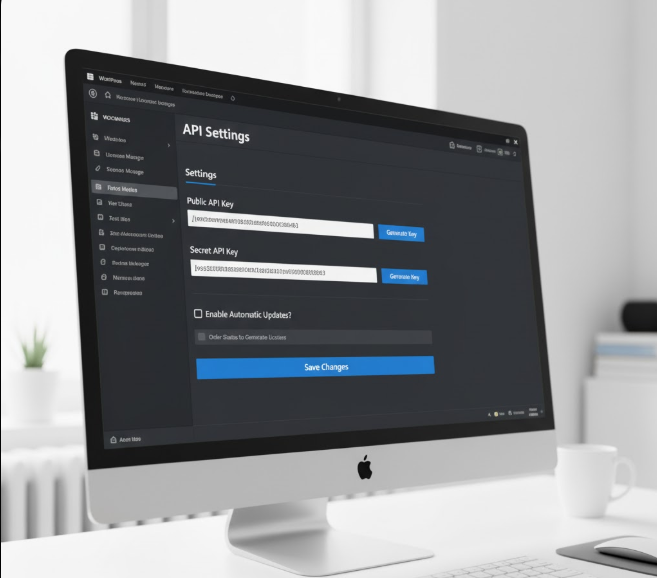
- License Activation: A built-in API lets your customers activate their license from inside your software.
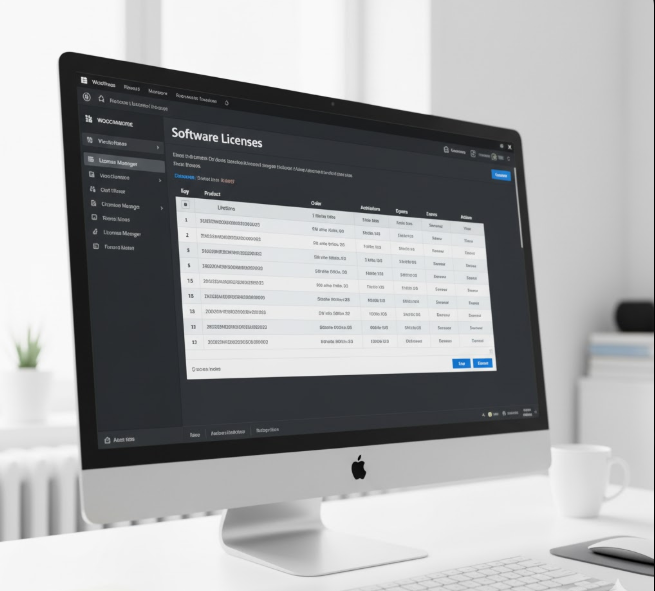
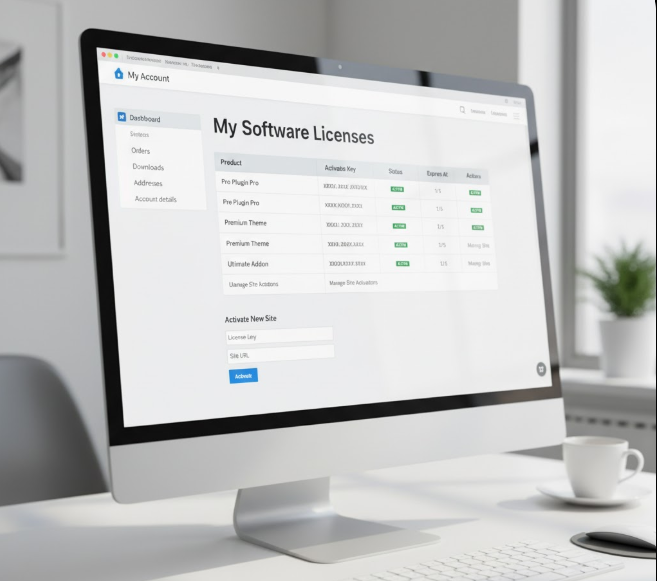
- License Management: A central dashboard for you (and a “My Account” page for your customers) to see all keys, activations, and expiration dates.
- Automatic Updates: This is the big one. You can upload new versions of your software, and your customers will get the “update available” notification right in their WordPress dashboard, just like a professional plugin.
Who is This For?
This plugin is for any developer, creator, or agency that sells software and values their time:
- WordPress Plugin & Theme Developers
- Desktop Software Creators
- Sellers of Digital Assets & Subscriptions
- Anyone tired of manually managing a spreadsheet of license keys!
How Does it Work? (The “How” and “When”)
 The magic happens the moment you make a sale.
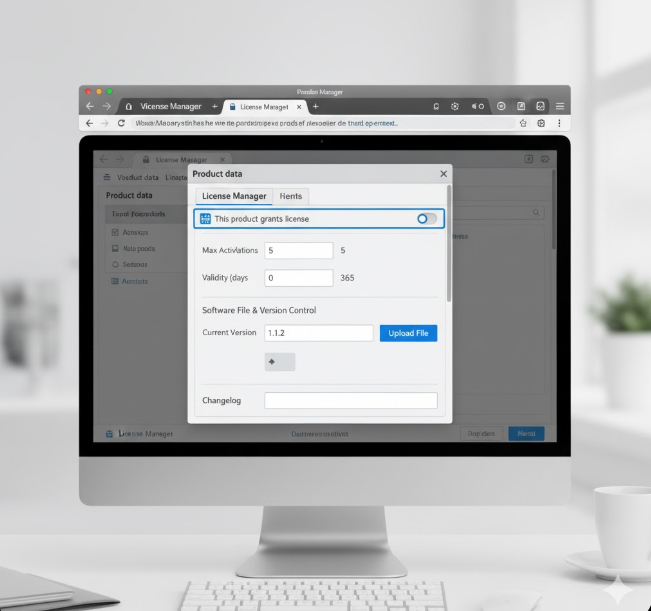
- How to Set Up: Install the plugin. Go to a WooCommerce product, click the new “License Manager” tab, and check “This product grants a license.” That’s it.
- When a Customer Buys: As soon as their WooCommerce order is marked “Completed,” the plugin instantly generates their license key and emails it to them.
- How Updates Work: When you have a new version (e.g.,
1.1), you go to that same product, update the version number, and upload the new.zipfile. The plugin handles the rest, sending a secure, time-limited download link to all customers with a valid license. - How You Manage: Go to the “License Manager” menu in your admin to see all keys, add one manually, or see which sites are active for a specific customer.
Why Is It Better? (And More Cost-Effective)
 We built this plugin because the alternatives weren’t good enough. Other platforms are either missing key features or charge a huge monthly fee.
- No Monthly Fees: Why pay a 10% commission or a high monthly subscription to a third-party site? This plugin lives on your store. You control your data, your customers, and your revenue.
- All-in-One: You get a license generator, a management dashboard, and an auto-update delivery system in one purchase.
- WooCommerce Native: It’s built for WooCommerce. It uses variable products so you can easily sell “1 Site,” “5 Sites,” or “Unlimited” tiers.
- Fully Tested: This plugin has been tested with the latest versions of WordPress and WooCommerce to ensure a smooth, stable experience.
Get Started Today for FREE
We believe in this tool so much that we want you to try it. You can download the Ultimate WooCommerce Licenses Manager and use it for free to manage your first licensed product.
ultimate-woocommerce-licenses-manager Download the plugin and test free. When you’re ready to unlock unlimited products, you can purchase the Pro version and activate it with the very same system it helps you build.
Stop managing. Start building. Download the plugin today and automate your software business.
IMPORTANT
=== Ultimate WooCommerce Licenses Manager – Client Integration README ===
Description: This documentation explains how to set up automatic licensing and updates for your product using the Ultimate WooCommerce Licenses Manager (UWLM) running on your store. Author: [Ultimate Multimedia Consult] License: GPLv2 or later License URI: https://www.gnu.org/licenses/gpl-2.0.html
WELCOME!
This guide is for developers and users who want to integrate a WordPress plugin or theme with the Ultimate WooCommerce Licenses Manager (UWLM) running on their own WooCommerce store. UWLM allows you to automatically generate, manage, and validate license keys, and even deliver automatic updates for your software.
This readme.txt explains:
- What UWLM does for your products.
- How users interact with their licenses.
- Crucially, the code you need to add to your client’s plugin or theme to enable license validation and automatic updates.
1. What is the Ultimate WooCommerce Licenses Manager (UWLM)?
UWLM is a powerful WordPress plugin that runs on your main WooCommerce store. Its purpose is to automate the entire licensing process for the digital products you sell.
- Generates Licenses: When a customer buys your product, UWLM automatically creates a unique license key for them.
- Manages Activations: It tracks how many times a license has been activated and on which websites.
- Validates Licenses: It provides a secure API that your client’s product can use to check if a license key is valid, active, and not expired.
- Delivers Updates: It enables your client’s product to receive automatic updates directly from your store, just like regular WordPress.org plugins.
2. How Your Customers Interact with Licenses
For your customers, the process is simple:
- Purchase: They buy your plugin/theme from your WooCommerce store.
- Receive Key: After purchase, they receive their unique license key via email.
- Enter Key: They go to your plugin/theme’s settings page on their WordPress site and paste their license key into a designated field.
- Activate: They click an “Activate” button. Your plugin then communicates with your store via UWLM to validate and activate the license.
- Enjoy Updates: Once activated, their plugin/theme will automatically receive update notifications from your store.
3. Developer Integration: Enabling Licensing in Your Client’s Product
To make your client’s plugin/theme communicate with UWLM on your store, you need to add some code. This code will handle the license input, activation, validation, and update checks.
Important: This code should go into your client’s plugin’s main file, or an included file, not directly into functions.php on the client’s site (unless you are developing a theme, in which case a separate licensing-functions.php file within your theme is appropriate).
Step-by-Step Implementation:
A. Define Your Store URL and Product ID
You’ll need to tell your client’s plugin where your store is and what its specific product ID is.
- YOUR_STORE_URL: This is the full URL to your WooCommerce store where UWLM is installed (e.g.,
https://www.yourdomain.com). - YOUR_PRODUCT_ID: This is the WooCommerce Product ID (or Variation ID) of this specific plugin or theme you are selling. You can find this in your WooCommerce admin by editing the product – it’s typically next to the product title or in the URL.
Add this to the top of your plugin’s main file (or a file included by it):
<?php
// Define constants for your licensing server and product.
// IMPORTANT: Replace these with your actual store URL and product ID.
if ( ! defined( 'MY_PLUGIN_STORE_URL' ) ) {
    // --- THIS LINE HAS BEEN FIXED ---
    define( 'MY_PLUGIN_STORE_URL', '[https://www.ultimatemultimediaconsult.com](https://www.ultimatemultimediaconsult.com)' ); // Replace with your store's URL
}
if ( ! defined( 'MY_PLUGIN_PRODUCT_ID' ) ) {
    define( 'MY_PLUGIN_PRODUCT_ID', 'XXXX' ); // Replace with the WooCommerce Product ID of THIS specific plugin/theme
}
if ( ! defined( 'MY_PLUGIN_SLUG' ) ) {
    define( 'MY_PLUGIN_SLUG', 'your-plugin-slug' ); // Replace with the slug of YOUR plugin/theme (e.g., 'my-awesome-plugin')
}
if ( ! defined( 'MY_PLUGIN_FILE' ) ) {
    // This assumes this code is in your plugin's main file.
    // If not, adjust the path accordingly.
    define( 'MY_PLUGIN_FILE', __FILE__ );
}
?>
B. Create a License Settings Page/Section
Your customers need a place to enter their license key. This example creates a simple settings page.
Add this to your plugin’s main file (or an included admin file):
<?php
// Add a menu page for license settings
add_action( 'admin_menu', 'my_plugin_license_menu' );
function my_plugin_license_menu() {
    add_options_page(
        __( 'My Plugin License', 'your-textdomain' ),
        __( 'My Plugin License', 'your-textdomain' ),
        'manage_options',
        MY_PLUGIN_SLUG . '-license',
        'my_plugin_license_page_content'
    );
}

// Render the content of the license settings page
function my_plugin_license_page_content() {
    // Check user capabilities
    if ( ! current_user_can( 'manage_options' ) ) {
        return;
    }

    // Handle form submission
    if ( isset( $_POST['my_plugin_license_nonce'] ) && wp_verify_nonce( $_POST['my_plugin_license_nonce'], 'my_plugin_license_action' ) ) {
        if ( isset( $_POST['my_plugin_license_key'] ) ) {
            $new_license_key = sanitize_text_field( $_POST['my_plugin_license_key'] );
            update_option( 'my_plugin_license_key', $new_license_key );

            // Attempt to activate or deactivate the license
            if ( isset( $_POST['my_plugin_activate_license'] ) ) {
                my_plugin_activate_license( $new_license_key );
            } elseif ( isset( $_POST['my_plugin_deactivate_license'] ) ) {
                my_plugin_deactivate_license( $new_license_key );
            }
        }
    }

    $license_key    = get_option( 'my_plugin_license_key', '' );
    $license_status = get_option( 'my_plugin_license_status', 'inactive' ); // 'active', 'inactive', 'expired', 'invalid'
    $license_expires = get_option( 'my_plugin_license_expires', '' );
    ?>
    <div class="wrap">
        <h1><?php esc_html_e( 'My Plugin License Settings', 'your-textdomain' ); ?></h1>
        <form method="post" action="">
            <?php wp_nonce_field( 'my_plugin_license_action', 'my_plugin_license_nonce' ); ?>
            <table class="form-table">
                <tr>
                    <th scope="row"><label for="my_plugin_license_key"><?php esc_html_e( 'License Key', 'your-textdomain' ); ?></label></th>
                    <td>
                        <input type="text" id="my_plugin_license_key" name="my_plugin_license_key" value="<?php echo esc_attr( $license_key ); ?>" class="regular-text" />
                        <p class="description"><?php esc_html_e( 'Enter your license key here to enable premium features and automatic updates.', 'your-textdomain' ); ?></p>
                    </td>
                </tr>
                <tr>
                    <th scope="row"><?php esc_html_e( 'License Status', 'your-textdomain' ); ?></th>
                    <td>
                        <?php
                        $status_class = 'notice-info';
                        switch ( $license_status ) {
                            case 'active':
                                $status_message = __( 'Active', 'your-textdomain' );
                                $status_class = 'notice-success';
                                break;
                            case 'expired':
                                $status_message = __( 'Expired', 'your-textdomain' );
                                $status_class = 'notice-warning';
                                break;
                            case 'invalid':
                                $status_message = __( 'Invalid', 'your-textdomain' );
                                $status_class = 'notice-error';
                                break;
                            default:
                                $status_message = __( 'Inactive', 'your-textdomain' );
                                $status_class = 'notice-info';
                                break;
                        }
                        echo '<p class="notice ' . esc_attr( $status_class ) . ' inline" style="margin:0; padding: 10px;">' . esc_html( $status_message );
                        if ( $license_status === 'active' && $license_expires && $license_expires !== 'lifetime' ) {
                            echo ' (' . sprintf( __( 'Expires: %s', 'your-textdomain' ), date_i18n( get_option( 'date_format' ), strtotime( $license_expires ) ) ) . ')';
                        }
                        echo '</p>';
                        ?>
                    </td>
                </tr>
            </table>
            <?php submit_button( __( 'Save Changes', 'your-textdomain' ) ); ?>
            <?php if ( 'active' !== $license_status ) : ?>
                <input type="submit" name="my_plugin_activate_license" class="button button-primary" value="<?php esc_attr_e( 'Activate License', 'your-textdomain' ); ?>" />
            <?php else : ?>
                <input type="submit" name="my_plugin_deactivate_license" class="button button-secondary" value="<?php esc_attr_e( 'Deactivate License', 'your-textdomain' ); ?>" onclick="return confirm('<?php esc_attr_e( 'Are you sure you want to deactivate this license?', 'your-textdomain' ); ?>');" />
            <?php endif; ?>
        </form>
    </div>
    <?php
}
?>
C. Implement API Communication Functions
These functions will make the actual calls to your UWLM store.
Add this to your plugin’s main file (or an included file):
<?php
/**
 * Function to activate the license key.
 *
 * @param string $license_key The license key to activate.
 */
function my_plugin_activate_license( $license_key ) {
    if ( empty( $license_key ) ) {
        add_settings_error( 'my_plugin_license_key', 'my_plugin_key_empty', __( 'Please enter a license key.', 'your-textdomain' ), 'error' );
        return;
    }

    $api_params = array(
        'license_key'  => $license_key,
        'product_id'   => MY_PLUGIN_PRODUCT_ID,
        'instance_url' => home_url(),
    );

    $response = wp_remote_post( MY_PLUGIN_STORE_URL . '/wp-json/uwlm/v1/activate', array(
        'timeout' => 15,
        'sslverify' => true, // Set to true in production if your server uses SSL
        'body'    => $api_params,
        // No need for X-Api-Key/Secret for client-side activate/check/version,
        // UWLM validates against the license_key itself.
    ) );

    if ( is_wp_error( $response ) ) {
        add_settings_error( 'my_plugin_license_key', 'my_plugin_api_error', sprintf( __( 'API Error: %s', 'your-textdomain' ), $response->get_error_message() ), 'error' );
        return;
    }

    $body = wp_remote_retrieve_body( $response );
    $data = json_decode( $body );

    if ( $data && isset( $data->activated ) ) {
        if ( $data->activated === true ) {
            update_option( 'my_plugin_license_key', $license_key );
            update_option( 'my_plugin_license_status', 'active' );
            update_option( 'my_plugin_license_expires', $data->expires_at ?? 'lifetime' );
            add_settings_error( 'my_plugin_license_key', 'my_plugin_activated', __( 'License activated successfully!', 'your-textdomain' ), 'success' );
        } else {
            update_option( 'my_plugin_license_status', 'invalid' ); // Or more specific error
            add_settings_error( 'my_plugin_license_key', 'my_plugin_activation_failed', sprintf( __( 'License activation failed: %s', 'your-textdomain' ), $data->message ?? $data->error ?? 'Unknown error.' ), 'error' );
        }
    } else {
        update_option( 'my_plugin_license_status', 'invalid' );
        add_settings_error( 'my_plugin_license_key', 'my_plugin_invalid_response', __( 'Invalid API response during activation.', 'your-textdomain' ), 'error' );
    }
}

/**
 * Function to deactivate the license key.
 *
 * @param string $license_key The license key to deactivate.
 */
function my_plugin_deactivate_license( $license_key ) {
    if ( empty( $license_key ) ) {
        add_settings_error( 'my_plugin_license_key', 'my_plugin_key_empty', __( 'License key not found for deactivation.', 'your-textdomain' ), 'error' );
        return;
    }

    $api_params = array(
        'license_key'  => $license_key,
        'instance_url' => home_url(),
    );

    $response = wp_remote_post( MY_PLUGIN_STORE_URL . '/wp-json/uwlm/v1/deactivate', array(
        'timeout' => 15,
        'sslverify' => true, // Set to true in production if your server uses SSL
        'body'    => $api_params,
    ) );

    if ( is_wp_error( $response ) ) {
        add_settings_error( 'my_plugin_license_key', 'my_plugin_api_error', sprintf( __( 'API Error: %s', 'your-textdomain' ), $response->get_error_message() ), 'error' );
        return;
    }

    $body = wp_remote_retrieve_body( $response );
    $data = json_decode( $body );

    if ( $data && isset( $data->deactivated ) ) {
        if ( $data->deactivated === true ) {
            delete_option( 'my_plugin_license_key' ); // Remove key on deactivation
            update_option( 'my_plugin_license_status', 'inactive' );
            delete_option( 'my_plugin_license_expires' );
            add_settings_error( 'my_plugin_license_key', 'my_plugin_deactivated', __( 'License deactivated successfully.', 'your-textdomain' ), 'success' );
        } else {
            add_settings_error( 'my_plugin_license_key', 'my_plugin_deactivation_failed', sprintf( __( 'License deactivation failed: %s', 'your-textdomain' ), $data->message ?? 'Unknown error.' ), 'error' );
        }
    } else {
        add_settings_error( 'my_plugin_license_key', 'my_plugin_invalid_response', __( 'Invalid API response during deactivation.', 'your-textdomain' ), 'error' );
    }
}

/**
 * Periodically check license validity.
 * This runs once per day to avoid spamming your API.
 */
add_action( 'admin_init', 'my_plugin_check_license_status' );
function my_plugin_check_license_status() {
    // Only check once a day, or if the status is unknown/inactive and license key exists.
    $last_check_time = get_transient( 'my_plugin_license_last_check' );
    $license_key     = get_option( 'my_plugin_license_key' );
    $license_status  = get_option( 'my_plugin_license_status', 'inactive' );

    if ( ! $license_key || ( $last_check_time && time() < $last_check_time + DAY_IN_SECONDS && $license_status === 'active' ) ) {
        return; // Don't check too often if already active, or if no key exists.
    }

    $api_params = array(
        'license_key' => $license_key,
        'product_id'  => MY_PLUGIN_PRODUCT_ID,
    );

    $response = wp_remote_get( add_query_arg( $api_params, MY_PLUGIN_STORE_URL . '/wp-json/uwlm/v1/check' ), array(
        'timeout'   => 15,
        'sslverify' => true, // Set to true in production if your server uses SSL
    ) );

    if ( is_wp_error( $response ) ) {
        // Log error but don't stop plugin functionality.
        error_log( 'My Plugin License Check API Error: ' . $response->get_error_message() );
        set_transient( 'my_plugin_license_last_check', time(), DAY_IN_SECONDS ); // Still rate limit.
        return;
    }

    $body = wp_remote_retrieve_body( $response );
    $data = json_decode( $body );

    if ( $data && isset( $data->valid ) ) {
        if ( $data->valid === true ) {
            update_option( 'my_plugin_license_status', 'active' );
            update_option( 'my_plugin_license_expires', $data->expires_at ?? 'lifetime' );
        } else {
            update_option( 'my_plugin_license_status', $data->error ?? 'invalid' ); // Use API error code for status
            update_option( 'my_plugin_license_expires', $data->expires_at ?? '' ); // Clear expiration if invalid
            if ( $data->error === 'key_expired' ) {
                 add_settings_error( 'my_plugin_license_key', 'my_plugin_expired_notice', __( 'Your license has expired. Please renew it to continue receiving updates and support.', 'your-textdomain' ), 'error' );
            } elseif ( $data->error === 'key_inactive' || $data->error === 'invalid_key' ) {
                 add_settings_error( 'my_plugin_license_key', 'my_plugin_invalid_notice', __( 'Your license key is invalid or inactive. Please check and re-enter it.', 'your-textdomain' ), 'error' );
            }
        }
    } else {
        update_option( 'my_plugin_license_status', 'error' );
        error_log( 'My Plugin License Check: Invalid API response.' );
    }

    set_transient( 'my_plugin_license_last_check', time(), DAY_IN_SECONDS ); // Update last check time
}
?>
D. Implement Automatic Updates
This is crucial for providing a seamless experience to your customers. WordPress has a built-in system for this.
Add this to your plugin’s main file (or an included file):
<?php
// Hook into the plugin update check process
add_filter( 'plugins_api', 'my_plugin_update_info', 10, 3 );
add_filter( 'site_transient_update_plugins', 'my_plugin_push_update', 10, 1 );

/**
 * Get plugin update information from your store.
 * This is primarily for the 'View details' link on the plugins page.
 */
function my_plugin_update_info( $res, $action, $args ) {
    if ( 'plugin_information' !== $action || empty( $args->slug ) || $args->slug !== MY_PLUGIN_SLUG ) {
        return $res;
    }

    $license_key = get_option( 'my_plugin_license_key' );
    if ( empty( $license_key ) || get_option('my_plugin_license_status', 'inactive') !== 'active' ) {
        return $res; // No update info if no active license
    }

    $api_params = array(
        'license_key' => $license_key,
        'product_id'  => MY_PLUGIN_PRODUCT_ID,
    );

    $response = wp_remote_get( add_query_arg( $api_params, MY_PLUGIN_STORE_URL . '/wp-json/uwlm/v1/version' ), array(
        'timeout'   => 15,
        'sslverify' => true, // Set to true in production if your server uses SSL
    ) );

    if ( is_wp_error( $response ) ) {
        error_log( 'My Plugin Update Info API Error: ' . $response->get_error_message() );
        return $res;
    }

    $body = wp_remote_retrieve_body( $response );
    $data = json_decode( $body );

    if ( $data && isset( $data->version ) ) {
        $res = new stdClass();
        $res->name        = __( 'My Plugin Name', 'your-textdomain' ); // Replace with your plugin's name
        $res->slug        = MY_PLUGIN_SLUG;
        $res->version     = $data->version;
        $res->author      = __( 'Your Name/Company', 'your-textdomain' ); // Replace
        $res->download_link = $data->download_url;
        $res->package     = $data->package;
        $res->url         = MY_PLUGIN_STORE_URL; // Link to your plugin's page on your store
        $res->sections    = array(
            'description' => __( 'Your plugin description here.', 'your-textdomain' ), // Replace
            'changelog'   => $data->changelog ?? __( 'No changelog provided.', 'your-textdomain' ),
        );
    }
    return $res;
}

/**
 * Pushes the update information into the WordPress update transient.
 * This makes the update available in the plugins list table.
 */
function my_plugin_push_update( $transient ) {
    if ( empty( $transient->checked ) ) {
        return $transient;
    }

    $license_key = get_option( 'my_plugin_license_key' );
    if ( empty( $license_key ) || get_option('my_plugin_license_status', 'inactive') !== 'active' ) {
        return $transient; // No updates if no active license
    }

    $api_params = array(
        'license_key' => $license_key,
        'product_id'  => MY_PLUGIN_PRODUCT_ID,
    );

    $response = wp_remote_get( add_query_arg( $api_params, MY_PLUGIN_STORE_URL . '/wp-json/uwlm/v1/version' ), array(
        'timeout'   => 15,
        'sslverify' => true, // Set to true in production if your server uses SSL
    ) );

    if ( is_wp_error( $response ) ) {
        error_log( 'My Plugin Push Update API Error: ' . $response->get_error_message() );
        return $transient;
    }

    $body = wp_remote_retrieve_body( $response );
    $data = json_decode( $body );

    if ( $data && isset( $data->version ) ) {
        // Get the current version of the plugin from its file header
        $plugin_data = get_file_data( MY_PLUGIN_FILE, array('Version' => 'Version') );
        $current_version = $plugin_data['Version'];

        if ( version_compare( $data->version, $current_version, '>' ) ) {
            $plugin_path = plugin_basename( MY_PLUGIN_FILE );
            $transient->response[ $plugin_path ] = (object) array(
                'slug'        => MY_PLUGIN_SLUG,
                'new_version' => $data->version,
                'url'         => MY_PLUGIN_STORE_URL,
                'package'     => $data->package,
                'tested'      => '6.7', // Latest WP version tested with
                'requires'    => '5.8', // Minimum WP version required
            );
        }
    }
    return $transient;
}
?>
E. (Optional) Restrict Features for Inactive Licenses
You might want to limit functionality if the license isn’t active.
<?php
/**
 * Example: Check license status before enabling a feature.
 */
function my_plugin_can_access_premium_feature() {
    $license_status = get_option( 'my_plugin_license_status', 'inactive' );
    return ( $license_status === 'active' );
}

// Example usage:
// if ( my_plugin_can_access_premium_feature() ) {
//     // Load premium features
// } else {
//     // Show a "Please activate your license" notice
// }
?>
ultimate-woocommerce-licenses-manager Download the plugin and use FREE
FAQs (Frequently Asked Questions)
Q: Where do I find my License Key?
A: Your license key is emailed to you immediately after purchase. You can also find it in your “My Account” area on [Your Store URL].
Q: My license won’t activate, what should I do?
A: Double-check that you’ve entered the key correctly (no extra spaces). Ensure your site can connect to [Your Store URL]. If the problem persists, contact support at [Your Support Email/Link].
Q: Will this plugin/theme still work if my license expires?
A: Yes, the plugin/theme will generally continue to function. However, you will no longer receive automatic updates, new features, or support until you renew your license.
Q: How do I get updates?
A: Once your license is activated, you will receive update notifications directly in your WordPress dashboard, just like any other plugin or theme from WordPress.org. Simply click “Update Now” when available.
Q: What if I move my site to a new domain?
A: You should deactivate the license on the old site first (if possible) through the plugin’s settings, then activate it on the new site. If you can’t access the old site, you can manage and deactivate instances from your “My Account” page on [Your Store URL].
Q: My plugin folder has spaces, is that okay?
A: While the licensing code will try to work, WordPress best practices recommend using dashes (-) instead of spaces in plugin or theme folder names (e.g., my-awesome-plugin instead of my awesome plugin). This can prevent unexpected issues.
5. Need Help?
If you encounter any issues or have questions regarding your license or the plugin’s functionality, please don’t hesitate to reach out to our support team:
Support Email: support@ultimatemultimediaconsult.com, ultimatemultimediaconsult@gmail.com
Support Link: https://www.ultimatemultimediaconsult.com/support or chat with the Agent on the site you will get help or get redirected to human agents
WhatsApp: +256770730170





Leave A Comment